Identifying Color-Band Resistors and Reading Their Values
色环电阻的识别与数值读取
色环电阻是在电阻封装上(即电阻表面)涂上一定颜色的色环,来代表这个电阻的阻值。色环实际上是早期为了帮助人们分辨不同阻值而设定的标准。色环电阻应用还是很广泛的,如家用电器、电子仪表、电子设备中常常可以见到。但由于色环电阻比较大,不适合现代高度集成的性能要求。
Resisotr Color Code Calculator
Resistor Color Code Calculator is a free Android app developed by Jedemm Technologies. It falls under the category of Utilities & Tools and is an essential app for electronics enthusiasts. This app helps users to calculate the resistance value of 4, 5, and 6 band resistors or find the color code based on the resistance value.
The app boasts a user-friendly interface and also includes additional features like viewing the history of consulted resistors. It also provides the option to share results as text or images. This app is a must-have for any electronics enthusiast or professional and is sure to make their life easier.
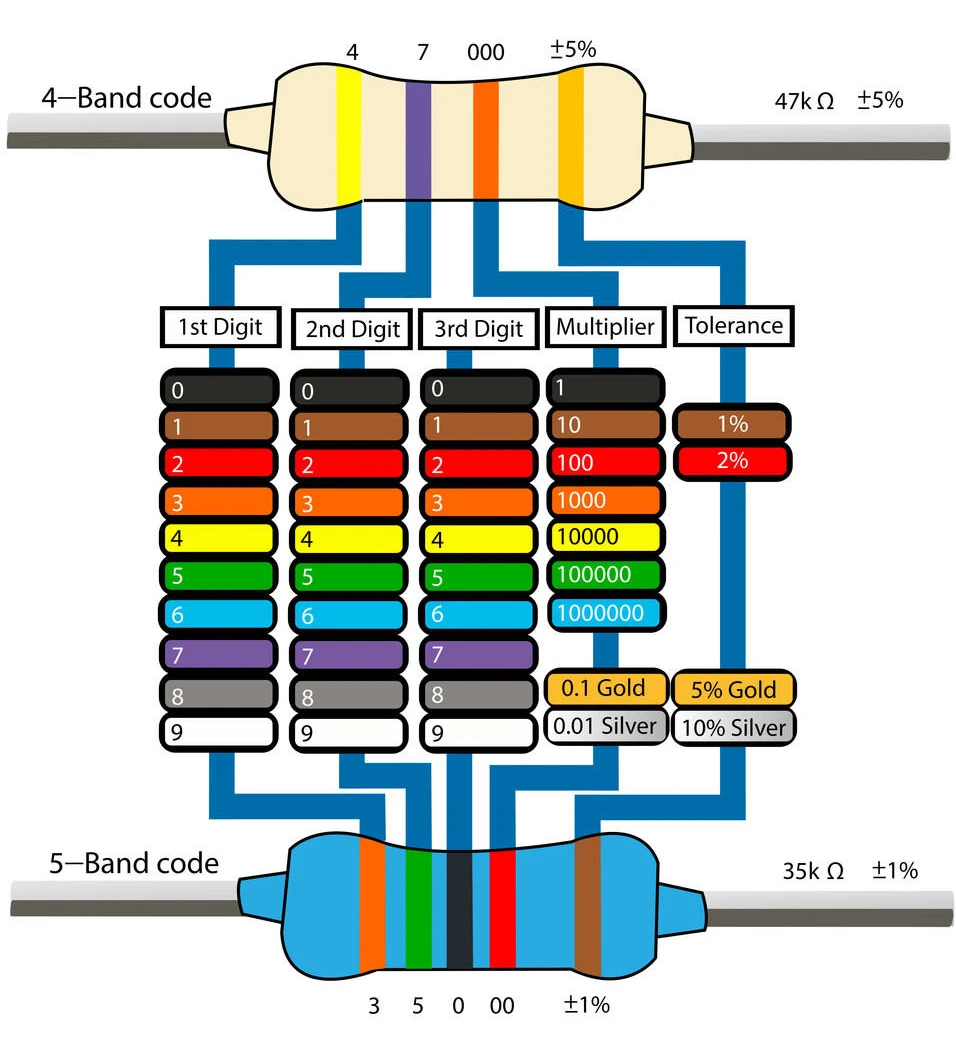
To identify color-band resistors and read their values, follow these steps:
Understand the Color Code: Resistors typically have colored bands that indicate their resistance value, tolerance, and sometimes temperature coefficient. The bands are read from left to right, with the tolerance band usually indicating the rightmost band.
Identify the Bands: Each color band corresponds to a specific digit in the resistance value. For example, a four-band resistor may have bands representing the first two digits, while a five-band resistor may have additional bands for higher precision.
Use a Color Code Chart: Refer to a color code chart to match the band colors to their corresponding values. This chart can help you quickly identify the resistance value without needing a multimeter.
Check Manufacturer Documentation: For precise values, always check the manufacturer's documentation or use a multimeter to verify the resistance value in critical applications.
By following these steps, you can accurately identify and read the values of color-band resistors used in electronic circuits.