TurboC install and debug runtime Environment

RonWang4 years ago (2022-02-28)电子编程 COD24

C语言调试运行环境TurboC的

 上大学时学习《C语言程序设计》(第二版)作者谭浩强,大部分编程时间是在学校机房度过,每次点开桌面的TurboC图标,就开始在里面敲代码,然后保存程序Abc.C,下一步进行编译,如果编译成功的话,就可以运行该程序检查运行结果。现在本文将回顾下这款TurboC的特点和安装。

TurboC

"TurboC/C++v3.0中文版"是为了照顾不熟悉DOS环境软件操作的广大初学者,让大家能在Windows环境下方便地安装和使用中文TurboC/C++3.0,对界面进行了汉化,并且为其完善了Windows以及中文DOS下的运行环境,经过重新包装后推荐给学习《C语言程序设计》与《C++面向对象程序设计》的广大师生。用户并不需要熟悉DOS知识,只需要在安装时将TurboC/C++v3.0指定安装在任意文件夹,再不需要手动更改任何选项,就能够正常编译程序。

主要功能

1. 为了照顾不熟悉DOS环境软件操作的广大初学者,让大家能在Windows环境下方便地安装TurboC/C++v3.0,本安装程序可以将TurboC/C++v3.0安装在任意指定目录,无需修改Options菜单里的Directory选项,即可正常编译标准C和C++程序!

2.“〖程序设计〗\TurboC&C++v3.0\配置工具”菜单中,建立了修改当前编译语法的快捷方式,您选择C或C++编译方式后再重新打开TurboC&C++3.0即可; 

3. 安装程序将在开始菜单上建立“〖程序设计〗\TurboC&C++v3.0”菜单,并建立启动TurboC++的快捷方式和配置卸载工具,还有其它相关的一些快捷方式; 

4. 您建立的C/C++程序文件将保存在“安装目录\TCPP\Project”目录下,开始菜单上会建立“我的Project目录”的快捷方式,令您保存更方便;

5. 程序输出的.OBJ和.exe文件将保存在“安装目录\TCPP\Output”目录下,开始菜单上会建立“输出文件Output目录”的快捷方式,令您管理更方便。

注意:由于与64位版本的Windows不兼容,Turbo C会无法启动或运行。安装程序之前要查看电脑属性是否32位,再进行安装。
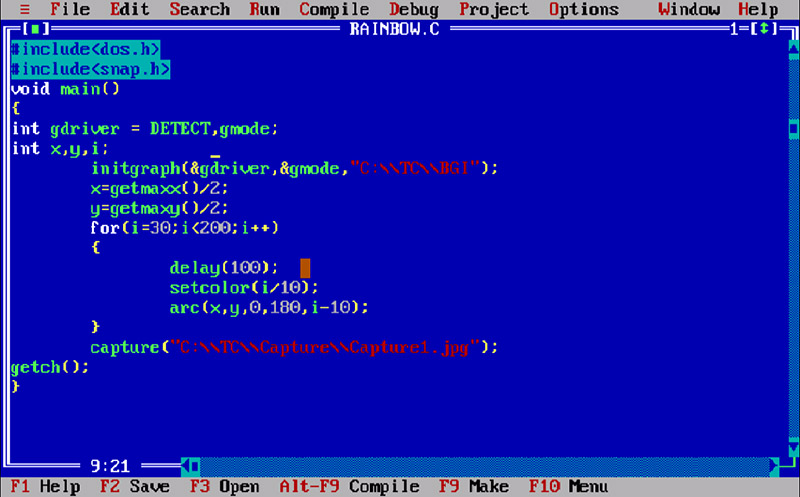
TurboC

下载安装

TurboC本站下载

TurboC的内部命令介绍 

按F1 获得有关当前我在的信息(运行、编译等的帮助)。

按F5 放大/缩小活动窗口。

按F6 开/关窗口。

按F10 菜单与活动窗口之间的相互切换。

64Bit系统使用C语言调试和运营环境

《C语言调试运行环境之Pelles C的安装》

Share with Friends:

Related Articles

CODE | LED Blink - Arduino Project 001

CODE | LED Blink - Arduino Project 001

Arduino 电子编程--灯项目及控制,主要使用Arduino编程控制LED灯,实现基本控制Project 1 LED闪烁,基本的应用Project 3和4红绿灯项目Project 1 …

CODE | LED Dot Matrix Display Beat Heart - Arduino Project 020

CODE | LED Dot Matrix Display Beat Heart - Arduino Project 020

You’re going to use the same circuit, but with a slight variation in the code to create a multi-fram…

CODE | Pulsating Lamp - Arduino Project 007

CODE | Pulsating Lamp - Arduino Project 007

You are now going try a more advanced method of controlling LEDs. So far, you have simply turned the…

CODE | Basic Stepper Control (Unipolar) - Arduino Project 028B

CODE | Basic Stepper Control (Unipolar) - Arduino Project 028B

In this very simple project, you will connect up a stepper motor and then get the Arduino to control…

CODE | LED Traffic Light - Arduino Project 003

CODE | LED Traffic Light - Arduino Project 003

You are now going to create a set of traffic lights that will change from green to red, via amber, a…

Installing Redis on CentOS and Configuring Redis

Installing Redis on CentOS and Configuring Redis

CentOS安装Redis及redis启动与关闭、配置Install RedisIn this section you’ll add theEPEL repository, and then…

Post a Comment

Anonymous

Feel free to share your thoughts and opinions here.