Mounting a Hard Drive on a CentOS Server

RonWang5 years ago (2021-05-26)电子编程 COD10

Centos服务器挂载硬盘

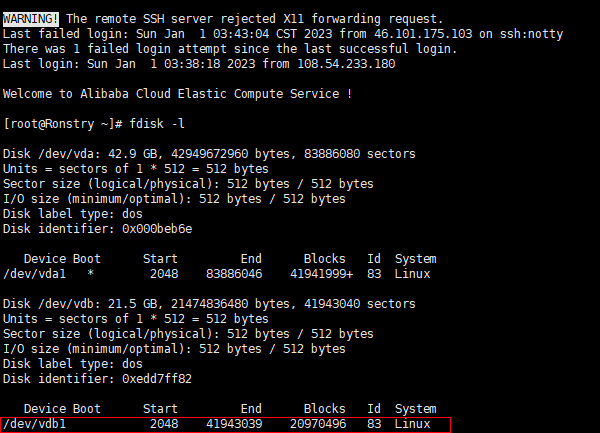
1. 查看服务器上未挂载的磁盘(磁盘有普通磁盘,高效磁盘,SSD磁盘

Bash
fdisk -l
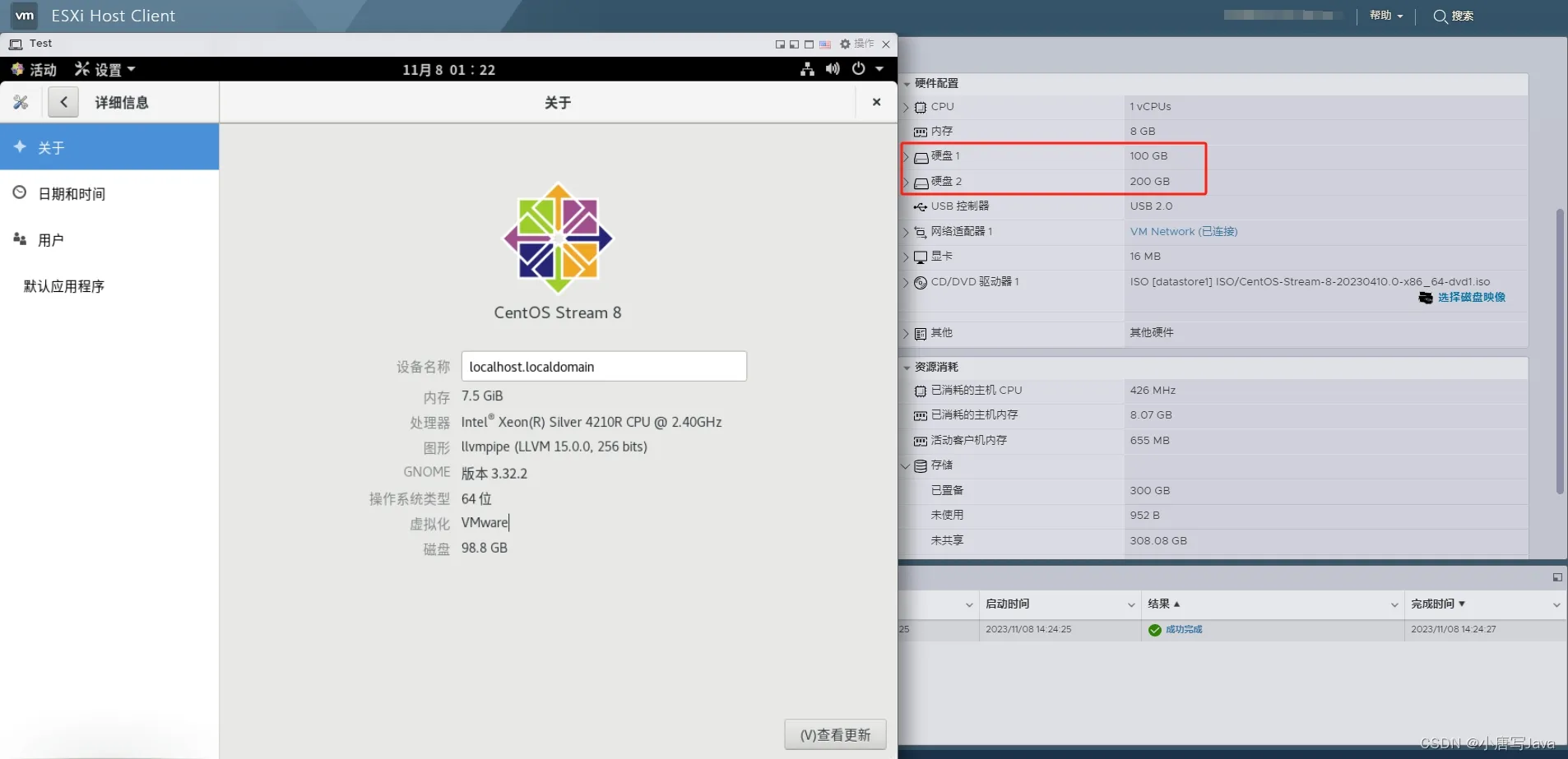
Centos

Amount Disk

2. 磁盘分区(分区有主分区,扩展 分区,逻辑分区)

Bash
fdisk /dev/vdb

n->p->1->回车->回车->w 步骤含义:

n:添加一个分区

p:主分区

两个回车指是开始和结束的磁盘扇区大小;

w:写入磁盘

3. 格式化磁盘并写入文件系统

Bash
mkfs.ext4 /dev/vdb1

//这里可以用ext3,也可以用ext4;

4. 挂载新磁盘到操作系统的某个节点上

Bash
mkdir /mnt1

//系统根目录创建目录mnt1,名称可自定义 

Bash
mount /dev/vdb1 /mnt1

//将磁盘挂载到创建的目录节点

5. 查看磁盘信息,确认挂载新磁盘是否成功

Bash
df

以上已成功挂载新磁盘。

6. 查看磁盘所有信息

用fdisk -l 命令查看,多了一个主分区:

Bash
/dev/vdb1

7. 查看磁盘的UUID

Bash
blkid

8. 设置开机启动自动挂载


新创建的分区不能开机自动挂载,每次重启机器都要手动挂载、设置开机自动挂载需要修改/etc/fstab文件。

Bash
vim /etc/fstab

 //打开后,在最后一行加入以下代码:

Bash
 /dev/vdb1 /mnt1 ext4 defaults 0 1

//如果上面用的是ext3,这里也要用ext3;

保存退出,对vim不熟悉的可查阅其他文章内容。 

重启服务器,至此磁盘挂载顺利完成。

Share with Friends:

Related Articles

CODE | Human Body Infrared Detector and Relay Light - Arduino Project 048

CODE | Human Body Infrared Detector and Relay Light - Arduino Project 048

Project 48 Human Body Infrared Detector and Relay LightThis Infrared Human Sensor referenc…

CODE | Serial Monitor - Arduino Programming Basic

CODE | Serial Monitor - Arduino Programming Basic

Arduino 程序基础,介绍Arduino程序的基本组成,第一部分编写数个例程,讲解关于变量及变量名称,串口监视器,if循环,for循环,while循环等。第二部分介绍了函数,全局变量,局部变量和静…

CODE | Basic Stepper Control (Unipolar) - Arduino Project 028B

CODE | Basic Stepper Control (Unipolar) - Arduino Project 028B

In this very simple project, you will connect up a stepper motor and then get the Arduino to control…

CODE | Dual Motor Driver L298N - Arduino Project 030A

CODE | Dual Motor Driver L298N - Arduino Project 030A

L298N Dual Motor Driver Project Description The L298N Motor Driver is a controller that uses an…

CODE | Liquid Crystal Displays-Serial to Display - Arduino Project 037

CODE | Liquid Crystal Displays-Serial to Display - Arduino Project 037

The DS18B20 Temperature Sensor is a digital temperature sensor capable of measuring temperatures wit…

CODE | Basic Stepper Control (Bipolar) - Serial to Display - Arduino Project 028A

CODE | Basic Stepper Control (Bipolar) - Serial to Display - Arduino Project 028A

In this very simple project, you will connect up a stepper motor and then get the Arduino to control…

Post a Comment

Anonymous

Feel free to share your thoughts and opinions here.