CODE | SD Card Temperature Datalogger - Arduino Project 043
Todady I made a simple Arduino datalogger using SD card and DHT11 relative humidity and temperature sensor. The Arduino datalogger that logs: date, time, temperature and humidity on an SD card.
In this project the DS3231 real time clock chip will be used to maintain the time as well as the date and the DHT11/DTH22 sensor to detect the relative humidity and the temperature. Also, in the circuit there will be two pushbuttons to set up the time and date and a 20×4 LCD screen to display all parameters (time, date, temperature and humidity) as shown below:
Project 43 Temperature SD Datalogger
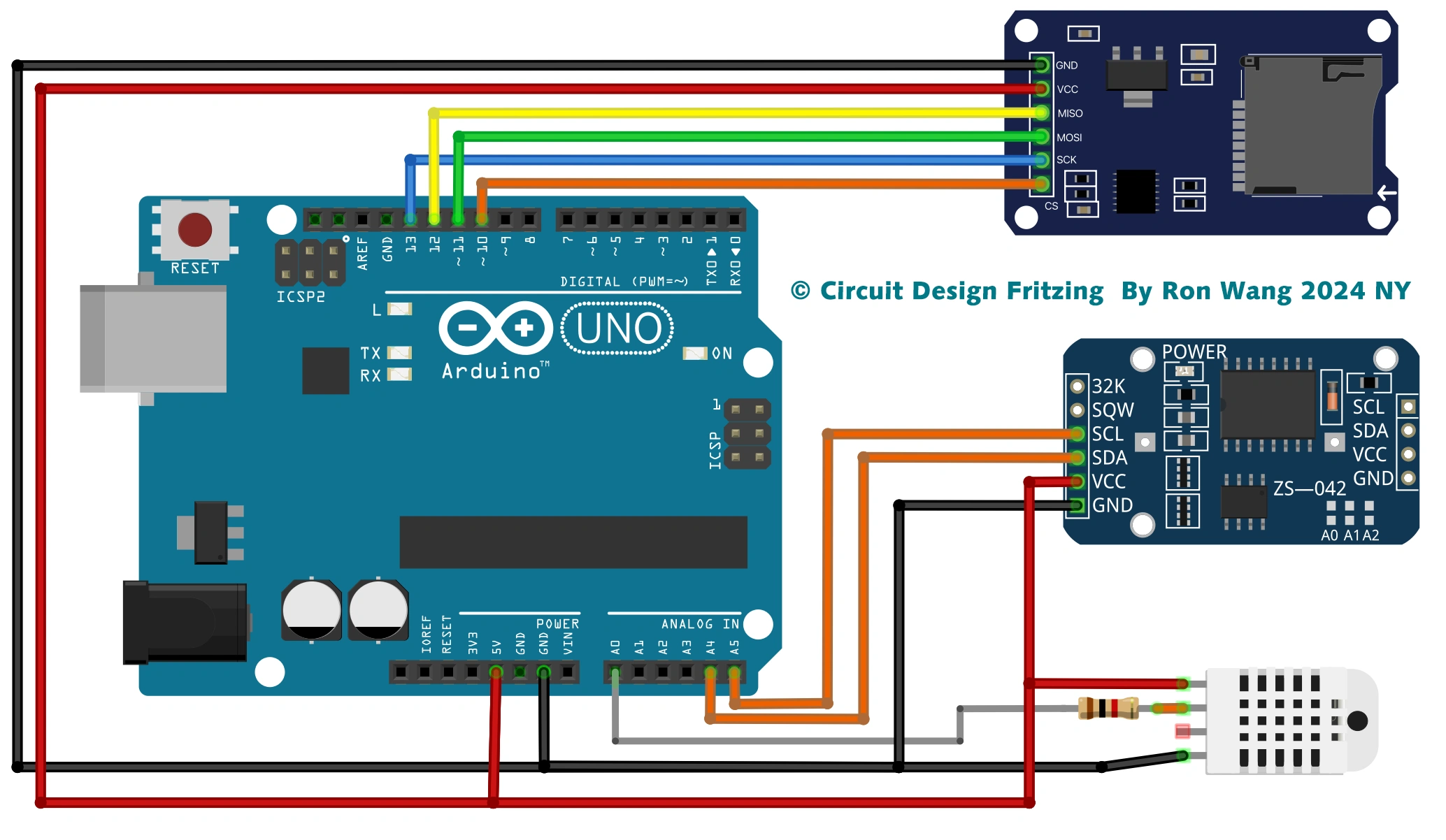
Arduino SD Card Record Temperature Circuit and Schematic
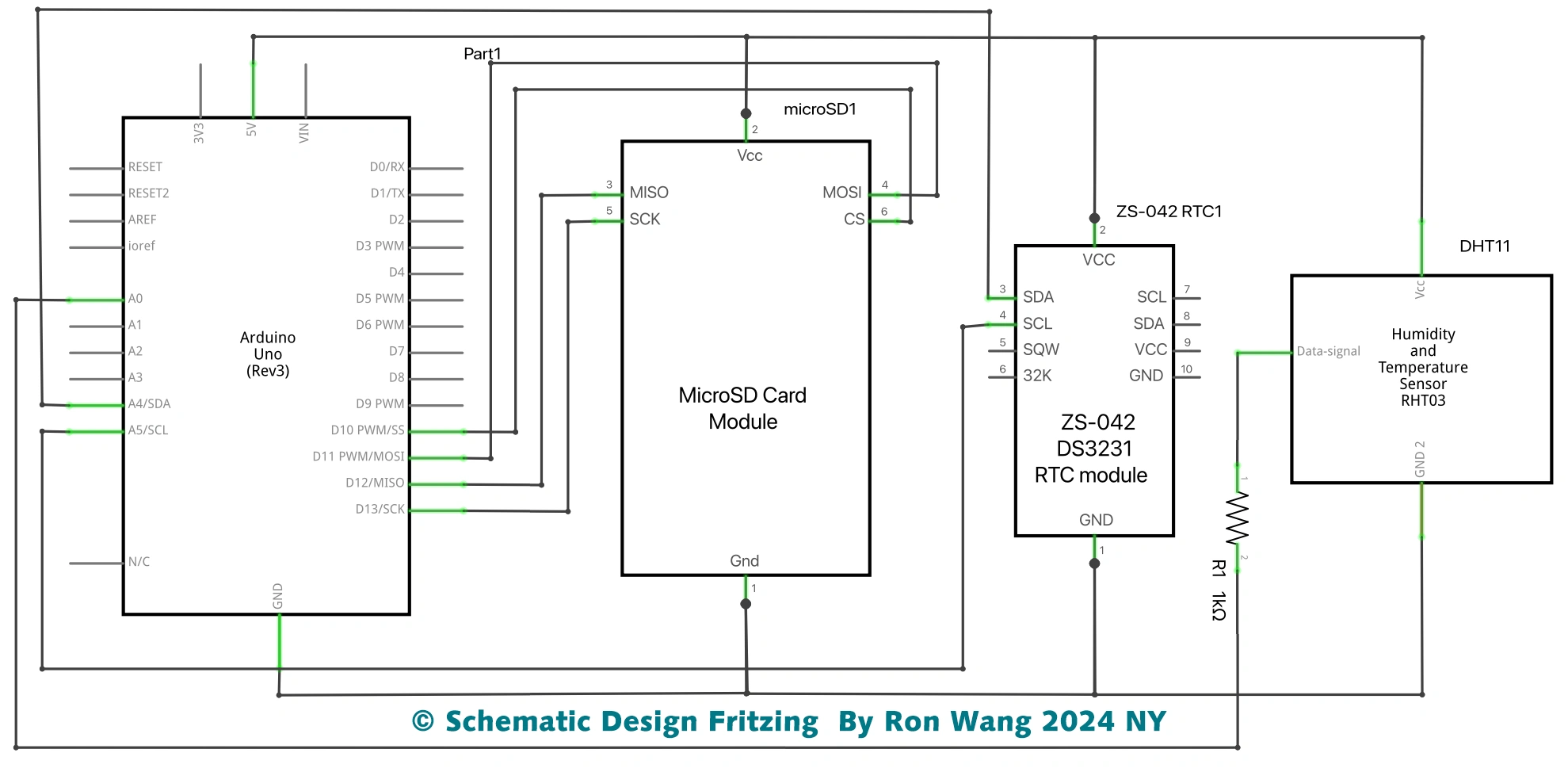
Arduino SD Card Record Temperature Circuit and Schematic
/* Coding Ron Wang
   Dec.10th 2024
   Autaba provides Hardware support for the project
   © Schematic Design Fritzing By Ron Wang 2024 NY
   © Circuit Design Fritzing By Ron Wang 2024 NY
  Project 43 Temperature DataLogger SD Card
 */
#include <SPI.h> //for the SD card module
#include <SD.h> // for the  SD card
#include <DHT.h> // for the DHT sensor
#include <RTClib.h> // for  the RTC

//define DHT pin
#define DHTPIN A0
s
#define DHTTYPE DHT11   //  DHT 11
//#define DHTTYPE DHT22 // DHT 22  (AM2302)
//#define DHTTYPE DHT21 // DHT 21 (AM2301)

// initialize DHT sensor for normal 16mhz Arduino
DHT  dht(DHTPIN, DHTTYPE);

// change this to match your SD shield or module;
// Arduino Ethernet shield and modules: pin 4
// Data loggin SD shields and modules:  pin 10

const int chipSelect = 4;

// Create  a file to store the data
File myFile;

// RTC
RTC_DS1307 rtc;

void  setup() {
  //initializing the DHT sensor
  dht.begin();

  //initializing  Serial monitor
  Serial.begin(9600);

  // setup for the RTC
  while(!Serial);  // for Leonardo/Micro/Zero
    if(! rtc.begin()) {
      Serial.println("Couldn't  find RTC");
      while (1);
    }
    else {
      // following line  sets the RTC to the date & time this sketch was compiled
      rtc.adjust(DateTime(F(__DATE__),  F(__TIME__)));
    }
    if(! rtc.isrunning()) {
      Serial.println("RTC  is NOT running!");
    }

  // setup for the SD card
  Serial.print("Initializing  SD card...");

  if(!SD.begin()) {
    Serial.println("initialization  failed!");
    return;
  }
  Serial.println("initialization done.");

  //open file
  myFile=SD.open("DATA.txt", FILE_WRITE);

  //  if the file opened ok, write to it:
  if (myFile) {
    Serial.println("File  opened ok");
    // print the headings for our data
    myFile.println("Date,Time,Temperature  ºC");
  }
  myFile.close();
}

void loggingTime() {
  DateTime  now = rtc.now();
  myFile = SD.open("DATA.txt", FILE_WRITE);
  if (myFile)  {
    myFile.print(now.year(), DEC);
    myFile.print('/');
    myFile.print(now.month(),  DEC);
    myFile.print('/');
    myFile.print(now.day(), DEC);
    myFile.print(',');
    myFile.print(now.hour(), DEC);
    myFile.print(':');
    myFile.print(now.minute(),  DEC);
    myFile.print(':');
    myFile.print(now.second(), DEC);
    myFile.print(",");
  }
  Serial.print(now.year(), DEC);
  Serial.print('/');
  Serial.print(now.month(),  DEC);
  Serial.print('/');
  Serial.println(now.day(), DEC);
  Serial.print(now.hour(),  DEC);
  Serial.print(':');
  Serial.print(now.minute(), DEC);
  Serial.print(':');
  Serial.println(now.second(), DEC);
  myFile.close();
  delay(1000);
}

void  loggingTemperature() {
  // Reading temperature or humidity takes about 250 milliseconds!
  // Sensor readings may also be up to 2 seconds 'old' (its a very slow sensor)
  // Read temperature as Celsius
  float t = dht.readTemperature();
  // Read  temperature as Fahrenheit
  //float f = dht.readTemperature(true);

  // Check if any reads failed and exit early (to try again).
  if  (isnan(t)  /*|| isnan(f)*/) {
    Serial.println("Failed to read from DHT sensor!");
    return;
  }

  //debugging purposes
  Serial.print("Temperature:  ");
  Serial.print(t);
  Serial.println(" *C");
  //Serial.print(f);
  //Serial.println(" *F\  ");

  myFile = SD.open("DATA.txt", FILE_WRITE);
  if (myFile) {
    Serial.println("open with success");
    myFile.print(t);
    myFile.println(",");
  }
  myFile.close();
}

void loop() {
  loggingTime();
  loggingTemperature();
  delay(5000);
}