Setting Up an LNMP Environment on CentOS 7.9 64-bit
CentOS 7.9 64位 搭建 LNMP环境
What is a LAMP
LAMP is a free and open source software suite combines four popular technologies (also referred to as "layers"):
Linux - uses as a server of the operating system performing the necessary tasks. The popularity of OS spread all over the world and widely used in all industries due to its flexible features and customization options compared with the other operating systems.
Apache is a web server equipped with the additional modules. It makes a web server compatible with the scripts written in the various programming languages.
MySQL is a DBMS running on Unix and Windows easy to use and it is suitable for the small projects and also for the large and complex sites.
PHP is a server-side dynamic scripting language (Perl or Python can also be used as it). Together with Apache, it helps to create dynamic web pages.
In other words, LAMP is a complex where the users' projects work stably, quickly and professionally.

运维网站及APP程序等,我们经常要使用云服务器,无论是阿里云,腾讯云,还是国外的亚马逊云,购置纯系统的服务器之后,需要自己安装和搭建环境LAMP。今天,我就带大家一起实战下CentOS 7.9 64bit系统上搭建LNMP环境。
配置 Nginx + PHP + Mysql步骤:
01. 服务器系统以及软件升级命令
yum -y update
02. 安装 epel-release
yum install epel-release -y
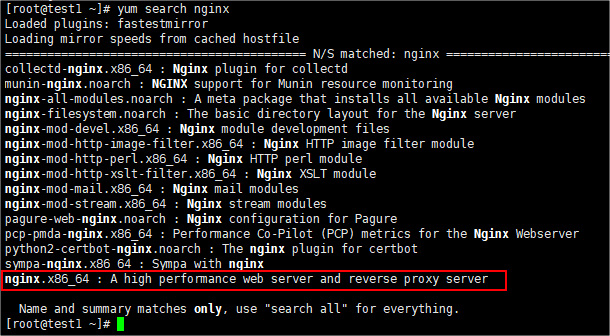
通过上面的命令进行安装。确认是否安装成功,用下面的命令检测确认。
yum search nginx
如果搜索的结果包含下面的这行内容,就表示安装成功了,然后我们就能愉快的安装我们需要的软件了。
nginx.x86_64 : A high performance web server and reverse proxy server
03.安装服务器常用软件
常用的软件如下,可以根据自身需求选型安装,不是都必须要安装。
# wget 下载工具yum install wget# 统一各种格式压缩文件的工具yum install atool# tmux 好用的终端工具(如何使用请自行搜索)yum install tmux# zsh 最好用的终端yum install zsh# 替代 top 命令的好工具yum install htop# git 代码版本管理工具yum install git
11.下面正式开始配置LNMP服务器环境
12.安装Nginx
如果直接从11开始配置服务器,请确保已经运行下面的命令,安装过epel -release。如果不是,请跳过这条命令。
yum install epel-release -y
开始安装:
# 安装 nginxyum install nginx -y# 启动 nginxsystemctl start nginx# 将 nginx 设置为开机启动systemctl enable nginx
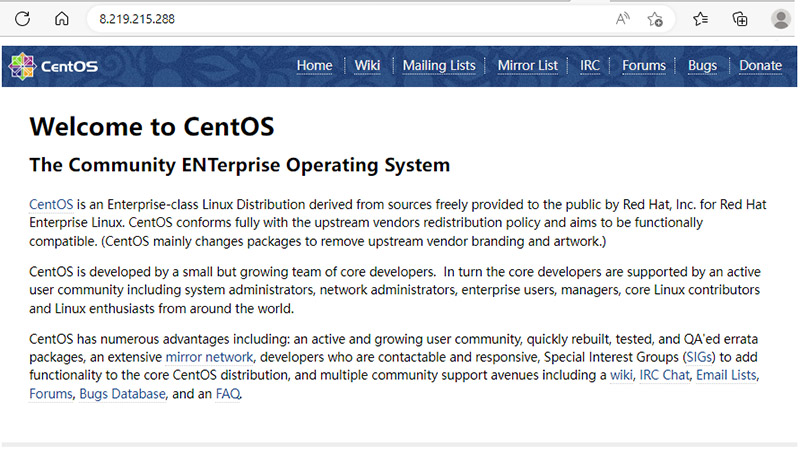
上面的三行命令执行之后,浏览器中可以直接使用服务器IP地址访问到Nginx默认的首页了,如下图。
13. 安装PHP
Nginx安装好之后,我们现在来安装PHP的环境,执行下面的命令,安装PHP以及它常用的库
yum install php php-mysql php-fpm php-gd php-imap php-ldap php-mbstring php-odbc php-pear php-xml php-xmlrpc php-zip -y
完成上述安装命令后,我们需要对PHP进行一些配置。
首先,我们打开配置文件:
vim /etc/php.ini
打开文件后,我们找到 cgi.fix_pathinfo 并把它的值设置为 0,位置一般在763行。
配置好php.ini文件之后,我们来配置 /etc/php-fpm.d/www.conf文件。
vim /etc/php-fpm.d/www.conf
第一处修改,将 listen = 127.0.0.1:9000 修改为如下:
listen = /var/run/php-fpm/php-fpm.sock
然后,找到下面两行,删掉前面的 ; 分号,取消注释。
listen.owner = nobody
listen.group = nobody
最后,我们找到下面两行
user = apache
group = apache
将 apache 换成 nginx,如下所示:
user = nginx
group = nginx
OK,这样,我们就已经安装并且配置好了。下面我们就可以启动PHP了。
# 启动PHPsystemctl start php-fpm# 将它设置为开机启动systemctl enable php-fpm
14. 配置Nginx使其支持PHP
我们安装好Nginx和PHP之后,他们还是格各自独立,不能协同工作,我们需要对Nginx进行一些配置后,Nginx和PHP两者才可以协同工作。
首先,我们打开 Nginx的配置文件。
vim /etc/nginx/nginx.conf
然后在 server 这一段的{}花括号中,添加如下内容:
location ~ \.php$ {try_files $uri =404;fastcgi_pass unix:/var/run/php-fpm/php-fpm.sock;fastcgi_index index.php;fastcgi_param SCRIPT_FILENAME $document_root$fastcgi_script_name;include fastcgi_params;}另外,还需要配置默认的首页文件,我们找到 index index.html index.htm; 这段配置,在中间添加 index.php 。如下所示:
index index.php index.html index.htm;
经过上述的简单配置,我们的Nginx和PHP便可正常工作了。
# 重启 nginx 服务systemctl restart nginx
15.安装MySQL(MariaDB)
php 的最佳拍档 mysql 我们还没有安装。这里,我们需要注意的是,自从 mysql 被收购之后,我们就不使用了,而是使用一个叫 mariadb 的从 mysql 发展而来的数据库,完全兼容。除了名字不同之外,其余全部都兼容。
# 安装 mariadbyum install mariadb-server mariadb# 启动 mariadbsystemctl start mariadb# 将 mariadb 设置为开机启动systemctl enable mariadb
数据安装成功后,默认情况,数据库的密码为空,我们需要设置数据库密码,运行下面的命令:
mysql_secure_installation
运行这个命令之后,根据提示进行相应的设置。一般情况下,就是连续按下回车,以及输入你的密码,确认密码,然后一路回车即可完成。
部署WEB项目
01. Nginx主目录
Nginx安装完成后默认的web项目主目录为:/usr/share/nginx/html
Nginx安装完成后默认的服务配置目录为:/etc/nginx
02. 上传项目代码
现在你可以上传你的web站点代码至html目录中了,上传方式有很多,svn、git、ftp、rz 等等,在实际开发工程中会使用到svn、git等项目管理软件。各软件详细的安装和使用方式将在专题文章中介绍。
03. 配置项目解析
当你成功上传你的项目到服务器上后,除非你的代码是静态的,否则目前为止还不能直接访问,需要做解析。那么如何做呢?下面将是其配置文件发挥作用的时候。
我们在Nginx的配置目录中进入conf.d文件夹中(有的配置可能在default.d文件夹中,具体可以查看nginx.conf文件最后的include是哪一个),创建一个项目的解析文件如web.conf(命名建议使用你的项目访问域名+.conf, 这样方便日后管理维护),具体内容可以简化为以下配置:
server {
    listen       80;
    server_name  一般为访问的域名;
    #charset koi8-r;
    #access_log  /var/log/nginx/host.access.log  main;
    location / {
        root   项目文件入口路径;
        index index.php index.html index.htm;if (!-e $request_filename) {
            rewrite  ^(.*)$  /index.php?s=$1  last;
            break;
        }
    }
    location ~ \.php$ {
        fastcgi_pass   127.0.0.1:9000;
        fastcgi_index  index.php;fastcgi_connect_timeout 300;fastcgi_send_timeout 300;fastcgi_read_timeout 300;fastcgi_buffer_size 64k;fastcgi_buffers 4 64k;
        fastcgi_param  SCRIPT_FILENAME  项目文件入口路径$fastcgi_script_name;
        include        fastcgi_params;
    }
    error_page   500 502 503 504  /50x.html;
    location = /50x.html {
        root   /usr/share/nginx/html;
    }}